FAQ
Frequently Asked Questions
Clear answers to the questions we receive most often

Got a question?
-
How can I contact the operator to correct data?
For data correction requests or clarifications, you can contact the operator’s customer service directly:
Vodafone Romania
- *222 (call from Vodafone network)
- 0372 022 222 (call from other networks)
Digi Mobil (RCS & RDS)
- *777 (call from Digi network)
- 031 400 7777 (call from other networks)
Orange Romania
- 300 (call from Orange network)
- 0374 300 300 (call from other networks)
- Alternatively: My Orange app or Orange stores
- The exact procedure is confirmed by the operator, depending on the situation
Telekom Romania
- 1234 (call from Telekom network)
- 021 404 1234 (call from other networks)
-
How can I obtain a fiscal invoice?
If the transaction was made for services such as vignette, Fetești bridge toll, or mobile top-up, the fiscal invoice is issued by us.
For issuance, please send to contact@selfpay.ro:
- The issued receipt;
- The company VAT number (RO);
- The company name;
- The unique registration code (CUI).
The invoice will be issued and sent automatically by email. 📩
-
How do I top up if Telekom was taken over by Digi? Should I select Telekom or Digi?
- If your phone still shows the Telekom network, use the Telekom service, as before.
- If your phone displays the Digi network, select the Digi service at the Payment Station.
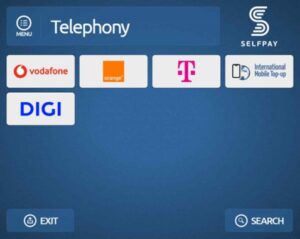
Both services are available at the Payment Stations. You can top up both Telekom and Digi numbers — the important thing is to select the network to which your number is currently ported.
-
I did not receive the credit, even though I received a receipt showing a successful transaction. What should I do?
If you received a receipt confirming that the transaction was successfully processed, but the credit has not yet been allocated to the entered number, please contact your mobile service provider. The operator can check the top-up status and provide support for credit activation.
Operator contacts:
- Vodafone Romania: *222 / 0372 022 222
- Digi Mobil: *777 / 031 400 7777
- Orange Romania: 300 / 0374 300 300
- Telekom Romania: 1234 / 021 404 1234
-
I entered the wrong license plate number when purchasing a vignette. What can I do?
Act quickly! Check the transaction time immediately on the top-right side of the receipt.
Did you notice the mistake immediately or within the first 60 minutes?
Go to any SelfPay Payment Station and correct the vehicle registration number:
Select “Vignette”, then choose “Correct license plate number for an existing vignette”.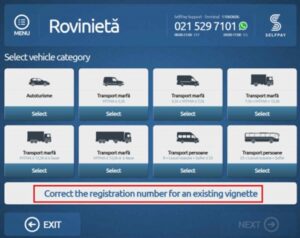
The correction is registered automatically and the vignette remains valid.
If more than 60 minutes have passed:
After 60 minutes, SelfPay can no longer make the correction. The solution is to submit a request to CNAIR. If the license plate number was entered incorrectly at the time of issuing the vignette, the correction can only be made through an official request to this institution.
Please send the request by email to roviniete@andnet.ro and venit@andnet.ro, together with:
- The receipt from the SelfPay Payment Station (proof of vignette issuance);
- A copy of the vehicle registration certificate.
CNAIR will review the request and, if it complies with legal provisions, will make the correction within a maximum of 5 business days.
Until written confirmation is received from CNAIR, the vignette is not considered valid for the corrected license plate number.
-
I entered the wrong phone number when making a top-up.
SelfPay cannot modify the transaction if the user entered the wrong phone number. The amount is transferred instantly to the mobile operator, and after the transaction is completed, it is no longer technically possible to modify or cancel it.
Users are advised to check directly with the operator whether cancellation or modification is available. Depending on their internal rules and verification, the user will receive the final response.
SelfPay understands that such situations can be unpleasant and recommends carefully checking the entered number before confirming future payments.
-
I made a payment for Orange/Digi and it does not appear as paid at the provider.
Please check the transfer term indicated on the receipt.
Normally, payments to these providers are transmitted within 1 business day, but the actual allocation of the amount to the account is carried out by the provider and may take between 1 and 4 business days.
Until the payment status is updated in the provider’s system, you may use the receipt as proof of payment. 😊📄
-
I paid a bill and noticed that I entered incorrect payment details (customer code / invoice number, etc.).
Please send an email to contact@selfpay.ro including:
- The receipt issued by the Payment Station;
- The correct details for which the payment should have been made.
Your request is automatically registered in the system, even outside business hours, and will be handled as soon as possible.
-
I paid a fee for the Electronic Identity Card, then found out that I should not have paid it because the first CEI is free and I want a refund.
For the refund of the transaction related to the Electronic Identity Card fee, the National Printing House (CNIN) is the institution responsible for processing the refund.
There is an official refund form for CI/CEI fees, managed by CNIN, which you can complete online here:
https://www.cnin.ro/contact_restpas.phpIn the request, select the reason:
- “Fee paid unjustifiably / error” or
- “The first CEI is free”.
Important: The website mentions that the request is processed after the original receipt is submitted. Therefore, please keep the SelfPay receipt intact and legible.
More information:
- By email: rest-ci@cnin.ro;
- By phone: the numbers displayed on the receipt or on www.cnin.ro;
- In person: Bd. Iuliu Maniu 244-D, Sector 6, Bucharest.
If the receipt also includes a “Receipt Change”, you may send it to contact@selfpay.ro, and SelfPay will manage the refund request for that change amount.
-
I purchased a PaySafeCard/ABON code and entered the wrong email address.
Please send us an email at contact@selfpay.ro or complete the contact form at
https://www.selfpay.ro/contact/ with the following details:- The location of the Payment Station where you made the payment;
- The amount paid;
- The service you paid for;
- The email address entered in the transaction;
- A contact phone number for possible clarifications.
Your request is automatically registered in the system, even outside business hours. It will be handled by one of our colleagues, who will respond by email as soon as possible.
Important: The code is automatically sent to the email address entered during the transaction.
Recommendation:
To avoid unforeseen situations where, due to technical reasons, the paper receipt is not issued at the Payment Station, please:- Enter an email address that you have access to and can check;
- Carefully verify the email address displayed on the Payment Station screen before finalizing the payment.
-
There is an amount listed as “Receipt Change” on my receipt. What can I do with that amount?
You have two options:
- Use the change for a future payment:
- Select the desired service at the Payment Station (it can be the same or a different service from the full list);
- On the final screen, on the right-hand side, select “Change Voucher”;
- Then:
- Scan the barcode on the receipt, or
- Select “Enter code” and manually enter the 12-digit code;
- Check that the final printed receipt shows the status “Transaction successful”.
- Request a refund to your bank account:
Send an email to contact@selfpay.ro with:- The receipt that contains “Receipt Change”;
- Your bank account (IBAN) in RON, registered to an individual;
- The full name of the bank account holder to whom the refund should be made.
After processing, you will receive an email with details regarding the allocation of the amount to the indicated account.
- Use the change for a future payment:
Pay for whatever you want, anytime, anywhere!
Simple, secure, and fast
Instantly pay for any of the 300+ services available at Payment Stations or in the SelfPay Now app.
Trusted by millions
We’re proud to have over 3 million customers using our services every month.
A super ecosystem that makes your life easier
Over 14,000 SelfPay Payment Stations nationwide and the SelfPay Now app available anytime directly on your phone.